> ## Documentation Index
> Fetch the complete documentation index at: https://www.activepieces.com/docs/llms.txt
> Use this file to discover all available pages before exploring further.
# Worker Groups
> Reserve dedicated worker capacity for specific projects
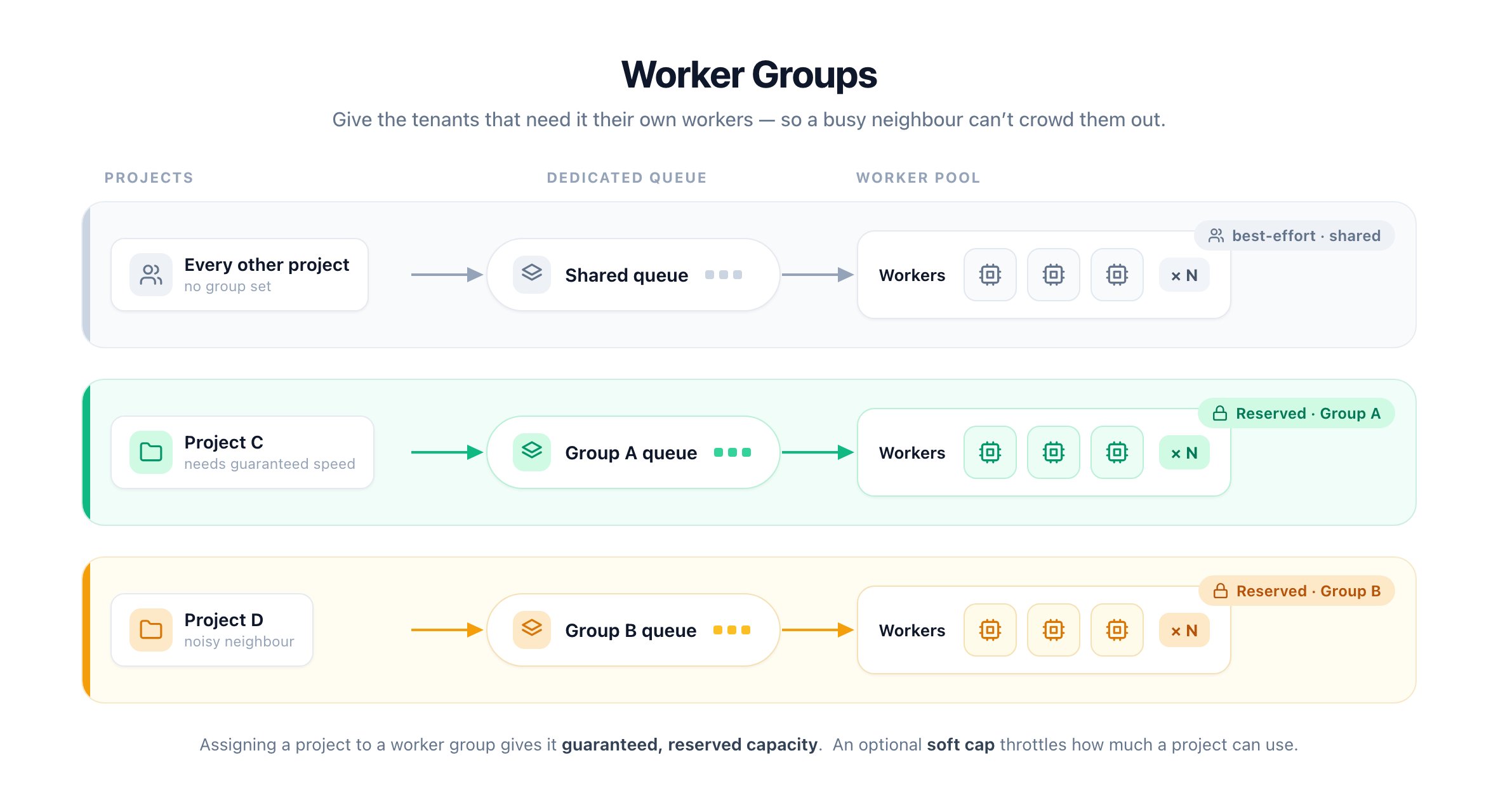
By default every worker serves every project from one shared queue. When one busy project floods it, everyone else waits.
**Worker groups** fix that. A group is a named pool of workers with its own dedicated queue. Assign a project to a group and its runs get reserved workers no other project can take.
 ## Floor vs. ceiling
* A **worker group** is a **floor**: capacity reserved for a project that nobody else can use.
* A **soft cap** is a **ceiling**: an optional per-project limit on how much a project can use. See [Manage Concurrency](/docs/admin-guide/guides/manage-concurrency) for details.
Use both together to guarantee capacity for busy projects and cap the rest.
## How it works
A worker joins a group by setting its group ID at startup. `AP_PROJECT_WORKER` selects the group's scope:
* **Project** group — leave `AP_PROJECT_WORKER=true` (the default). Assign individual projects to it from the platform's Workers → Assignments page.
* **Platform** group — set `AP_PROJECT_WORKER=false`. Serves the whole platform's runs; used for dedicated/canary fleets.
```bash theme={null}
# Project group, e.g. 1cpu_machine (AP_PROJECT_WORKER defaults to true)
AP_WORKER_GROUP_ID=1cpu_machine
# Platform group
AP_WORKER_GROUP_ID=canary
AP_PROJECT_WORKER=false
```
Grouped workers run in a process-isolated execution mode, so set:
```bash theme={null}
AP_EXECUTION_MODE=SANDBOX_PROCESS # or SANDBOX_CODE_AND_PROCESS
AP_REUSE_SANDBOX=true # or false, must be set explicitly
```
Once a project is assigned to a group, its flow and webhook runs are routed to that group's dedicated queue (`project--jobs`) and picked up only by workers carrying the matching `AP_WORKER_GROUP_ID` with `AP_PROJECT_WORKER=true`. Projects without a group keep drawing from the shared queue.
## Assigning projects to a group
You can assign a project to a project group in two ways:
* **UI** — go to **Platform → Infrastructure → Workers** (`/platform/infrastructure/workers`), open the **Assignments** tab, and pick the group for each project.
* **API** — set `workerGroupId` on the project via the projects API. Use the bare group name (the same value as the group's `AP_WORKER_GROUP_ID`); pass `null` to unassign and return the project to the shared queue.
The same request also sets `maxConcurrentJobs` — the project's **concurrency limit** (the soft-cap ceiling). It's the maximum number of flow runs the project executes at once:
* **Omit it** (or send `null`) and the project uses the default: `min(plan limit, group slots)` — i.e. it can use the group's full reserved capacity, up to the plan's limit.
* **Set a number** to cap the project below that. The value is clamped to the group's slot count (a project can't run more concurrently than its pool can serve).
```bash theme={null}
curl -X POST 'https://your-instance.com/api/v1/projects/' \
-H 'Authorization: Bearer ' \
-H 'Content-Type: application/json' \
-d '{ "workerGroupId": "1cpu_machine", "maxConcurrentJobs": 2 }'
```
## Floor vs. ceiling
* A **worker group** is a **floor**: capacity reserved for a project that nobody else can use.
* A **soft cap** is a **ceiling**: an optional per-project limit on how much a project can use. See [Manage Concurrency](/docs/admin-guide/guides/manage-concurrency) for details.
Use both together to guarantee capacity for busy projects and cap the rest.
## How it works
A worker joins a group by setting its group ID at startup. `AP_PROJECT_WORKER` selects the group's scope:
* **Project** group — leave `AP_PROJECT_WORKER=true` (the default). Assign individual projects to it from the platform's Workers → Assignments page.
* **Platform** group — set `AP_PROJECT_WORKER=false`. Serves the whole platform's runs; used for dedicated/canary fleets.
```bash theme={null}
# Project group, e.g. 1cpu_machine (AP_PROJECT_WORKER defaults to true)
AP_WORKER_GROUP_ID=1cpu_machine
# Platform group
AP_WORKER_GROUP_ID=canary
AP_PROJECT_WORKER=false
```
Grouped workers run in a process-isolated execution mode, so set:
```bash theme={null}
AP_EXECUTION_MODE=SANDBOX_PROCESS # or SANDBOX_CODE_AND_PROCESS
AP_REUSE_SANDBOX=true # or false, must be set explicitly
```
Once a project is assigned to a group, its flow and webhook runs are routed to that group's dedicated queue (`project--jobs`) and picked up only by workers carrying the matching `AP_WORKER_GROUP_ID` with `AP_PROJECT_WORKER=true`. Projects without a group keep drawing from the shared queue.
## Assigning projects to a group
You can assign a project to a project group in two ways:
* **UI** — go to **Platform → Infrastructure → Workers** (`/platform/infrastructure/workers`), open the **Assignments** tab, and pick the group for each project.
* **API** — set `workerGroupId` on the project via the projects API. Use the bare group name (the same value as the group's `AP_WORKER_GROUP_ID`); pass `null` to unassign and return the project to the shared queue.
The same request also sets `maxConcurrentJobs` — the project's **concurrency limit** (the soft-cap ceiling). It's the maximum number of flow runs the project executes at once:
* **Omit it** (or send `null`) and the project uses the default: `min(plan limit, group slots)` — i.e. it can use the group's full reserved capacity, up to the plan's limit.
* **Set a number** to cap the project below that. The value is clamped to the group's slot count (a project can't run more concurrently than its pool can serve).
```bash theme={null}
curl -X POST 'https://your-instance.com/api/v1/projects/' \
-H 'Authorization: Bearer ' \
-H 'Content-Type: application/json' \
-d '{ "workerGroupId": "1cpu_machine", "maxConcurrentJobs": 2 }'
```