

What it looks like
One flow per worker. A small fleet of those. A thin tier of apps in front. Managed Postgres, Redis, and S3 behind — all in the same region.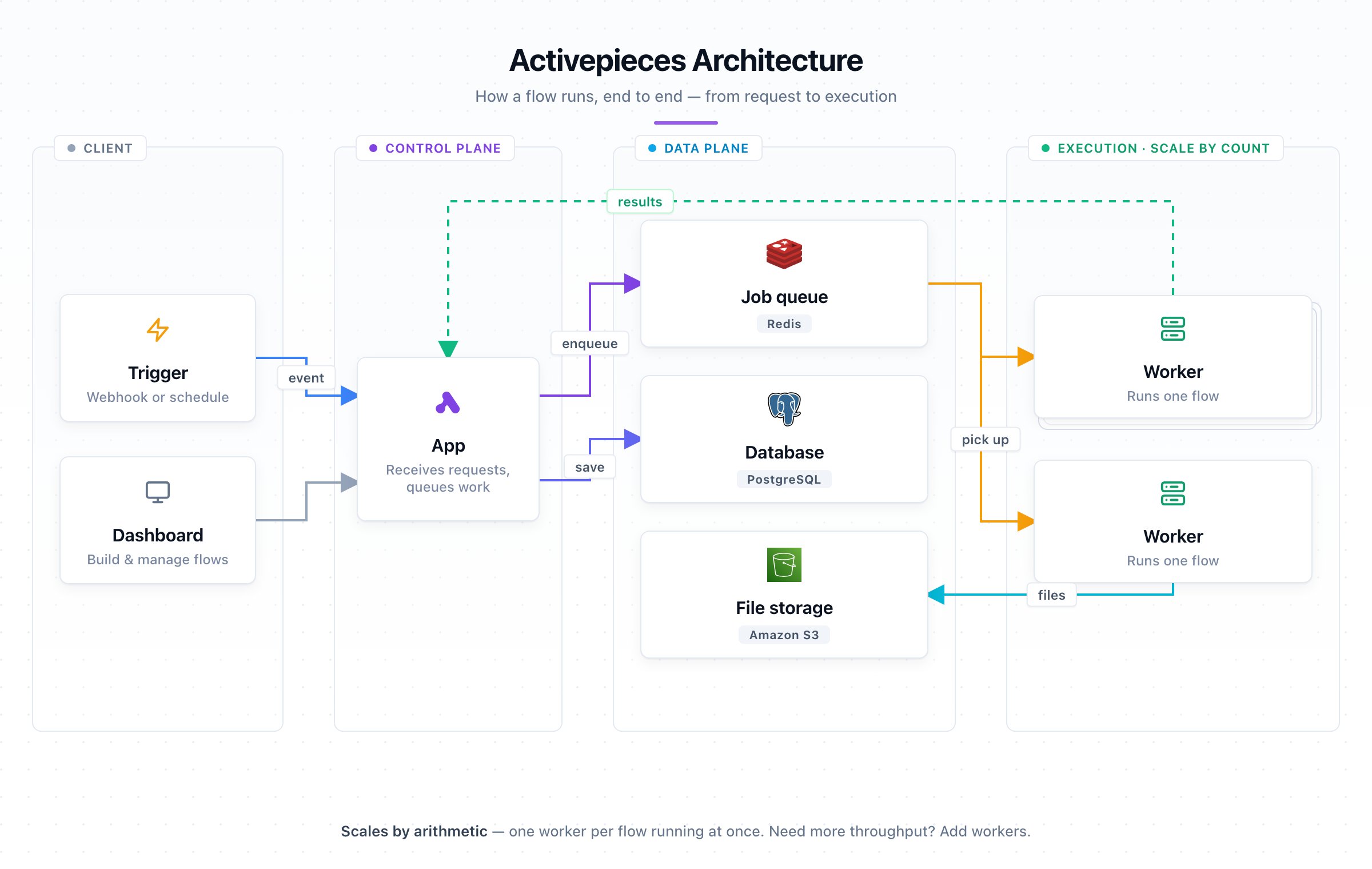
S3 is a hard requirement, not a nice-to-have: without it, every flow bundle and piece archive funnels through the app tier and the throughput numbers below no longer hold. (Walkthrough: S3 Storage.)
Recommended config
Copy this — these are the execution settings the benchmark below was measured on:On Separate Workers, the execution vars (
AP_WORKER_CONCURRENCY, AP_REUSE_SANDBOX, AP_EXECUTION_MODE) go on the worker containers and the S3 vars on the app containers. Running a single container for both (AP_CONTAINER_TYPE=WORKER_AND_APP, the default)? Set them all on it.Sizing
A concurrency-1 worker is busy for a flow’s whole duration (up to 10 min), so size by concurrent flows, not trigger rate: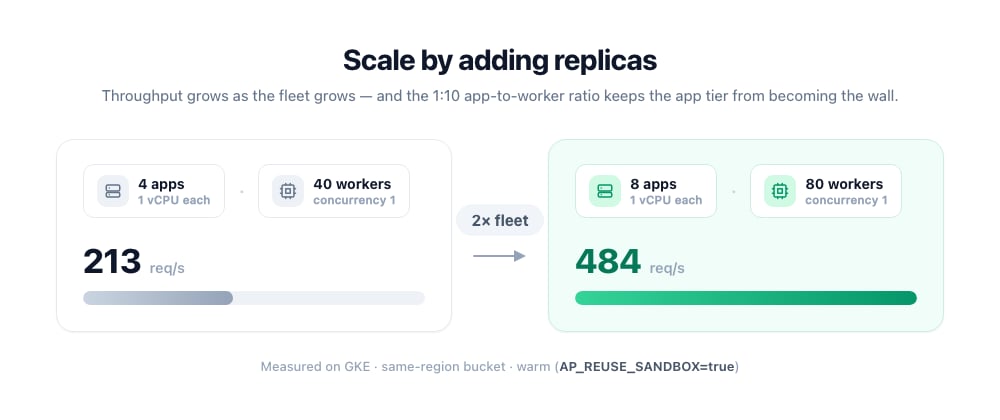
Limits
The complete table lives in Limits.
Need to reserve dedicated capacity for specific tenants? See Worker Groups.
Migrating to the recommended setup
Coming from a single combined container (AP_CONTAINER_TYPE=WORKER_AND_APP, the default — one image running the API and an embedded worker)? This is the path to a split app tier, a concurrency-1 worker tier, and S3. Apply it in a lower environment first, validate, then promote to production. Postgres and Redis don’t change — workers never touch them; only the app does.
1
Split app and worker
Same image, two roles selected by
AP_CONTAINER_TYPE:- Existing container → app. Set
AP_CONTAINER_TYPE=APP. It stops pulling flows and only serves the API and UI, so heavy runs can no longer slow the interface. - New worker container. Run the same image with three env vars — nothing else:
AP_FRONTEND_URL. Generate the token and see the full walkthrough on Separate Workers.2
Reshape the worker to one flow at a time
A concurrency-1 worker runs a single flow and is sized small; scale throughput by adding replicas, not by widening one container. Keep total slots constant:
slots = containers × concurrency.On Worker Groups, keep
AP_EXECUTION_MODE=SANDBOX_PROCESS; code-only mode is rejected for grouped workers.Not ready to reshape? Leave AP_WORKER_CONCURRENCY=5 and size each worker ~5× (≈5 GB); the split and S3 still stand on their own.3
Enable S3
Set on the app:With signed URLs on, file bytes flow directly between the worker/browser and S3 instead of through the app. Keep the bucket in the same region as your workers. Full env var list (bucket, keys, region): S3 Storage.