

Install with one command (recommended)
One line writes the config, generates your secrets, and starts everything. Run it in the folder where you want Activepieces to live:Install Activepieces with an AI assistant
Requirements
- Docker Compose v2. The old
docker-composewill not work. - At least 2 vCPU and 4 GB RAM.
- On Windows, WSL2. Run the command inside it.
Alternative: run Docker Compose yourself
Use this if you would rather not pipe a remote script into a shell, or your change process needs the compose file in front of it before anything starts. You get the same four containers, set up by hand.Show the manual steps
Show the manual steps
1. Get the compose file2. Generate your secretsThis copies Every one of those must have a value. If any is empty, install Both services share
.env.example to .env and fills in the passwords and keys. It needs openssl. If openssl is missing it will still report success while leaving the values blank, so check before you continue:openssl and run sh tools/deploy.sh again.3. Set the editionAdd this to .env. Without it you get the Community edition, and you will not be able to activate a license key later..env.example ships AP_EXECUTION_MODE=UNSANDBOXED, which the server rejects at startup on ee.4. Point the worker at the appIn docker-compose.yml, give the worker service its own AP_FRONTEND_URL:.env, where AP_FRONTEND_URL is your public URL. That address means “the app” to a browser but “myself” to the worker container, so without this override the worker cannot open its socket and the Workers page stays empty.5. Start itTwo more things worth changing before production. The image tag in
docker-compose.yml is pinned to a specific release, so bump it yourself when you upgrade. And worker is set to replicas: 5, which is more than a single small machine wants; see Production Setup for sizing.Open Activepieces
Go to http://localhost:8080, orhttp://<your-server-ip>:<your-port> if you installed on a remote server or changed the port.
The first account you create becomes the platform administrator. There is no default username or password.
Check it’s working
Up, and the health endpoint should respond.
Then sign in and open Platform Admin → Operations → Workers. You should see at least one worker. If the list is empty, see Troubleshooting.
What you’ve just set up
Four containers, defined inactivepieces/docker-compose.yml:
Your data is not in the
activepieces folder. It lives in the postgres_data Docker volume, so backing up the folder does not back up your flows.
Activate a license key (optional)
Your install runs on the free plan by default. If you have a trial or paid license key, activate it to unlock the paid features. See License key.Make webhooks reachable (optional)
Skip this if your server already has a public URL. Webhooks and app triggers need an address that third parties can reach. On a personal machine, expose it with a tunnel such as ngrok:AP_FRONTEND_URL in .env to the ngrok URL and restart.
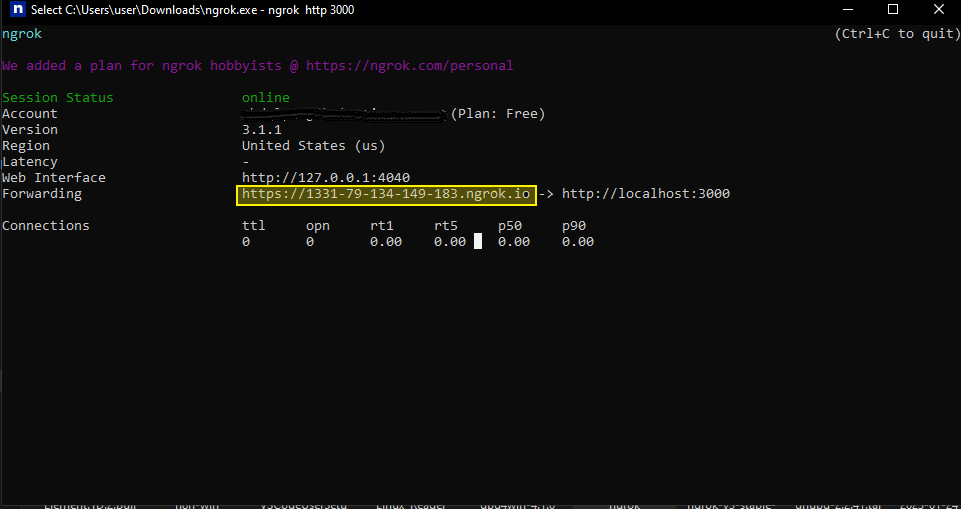
ngrok is fine for testing but not suitable for production. In production, point
AP_FRONTEND_URL at your real domain.Upgrade
Back up first:.env, your data, and any edits to docker-compose.yml are left alone.
Uninstall
Stop Activepieces and keep your data:Troubleshooting
The install command fails
The install command fails
Check which Docker Compose you have:If that errors, you are on Compose v1. The old
docker-compose will not work with this setup. Install Docker Compose v2.The Workers page is empty
The Workers page is empty
Your worker cannot reach the app. Check its logs:Repeated The app’s own
Socket.IO connection error means AP_FRONTEND_URL on the worker points at an address that does not resolve from inside the container. localhost refers to the worker itself, not the app. It must be the app’s service name on the Docker network:AP_FRONTEND_URL should stay as your public URL. See Websocket Issues.Port 8080 is already in use
Port 8080 is already in use
Install on another port:On an existing install, change
AP_HOST_PORT in .env and run docker compose -p activepieces up -d.Do not set AP_PORT. That is the app’s own listen port inside the container, and changing it breaks the port mapping.The app keeps restarting
The app keeps restarting
Read the startup error:A common cause is
AP_EXECUTION_MODE=UNSANDBOXED with AP_EDITION=ee, which is rejected at startup. Use SANDBOX_CODE_ONLY instead. See Sandboxing Mode.Reading the logs
Reading the logs
Going to production
Read Production Setup. It’s the one opinionated production shape, and every sizing choice flows from a single number.For the full list of settings, see Environment Variables.