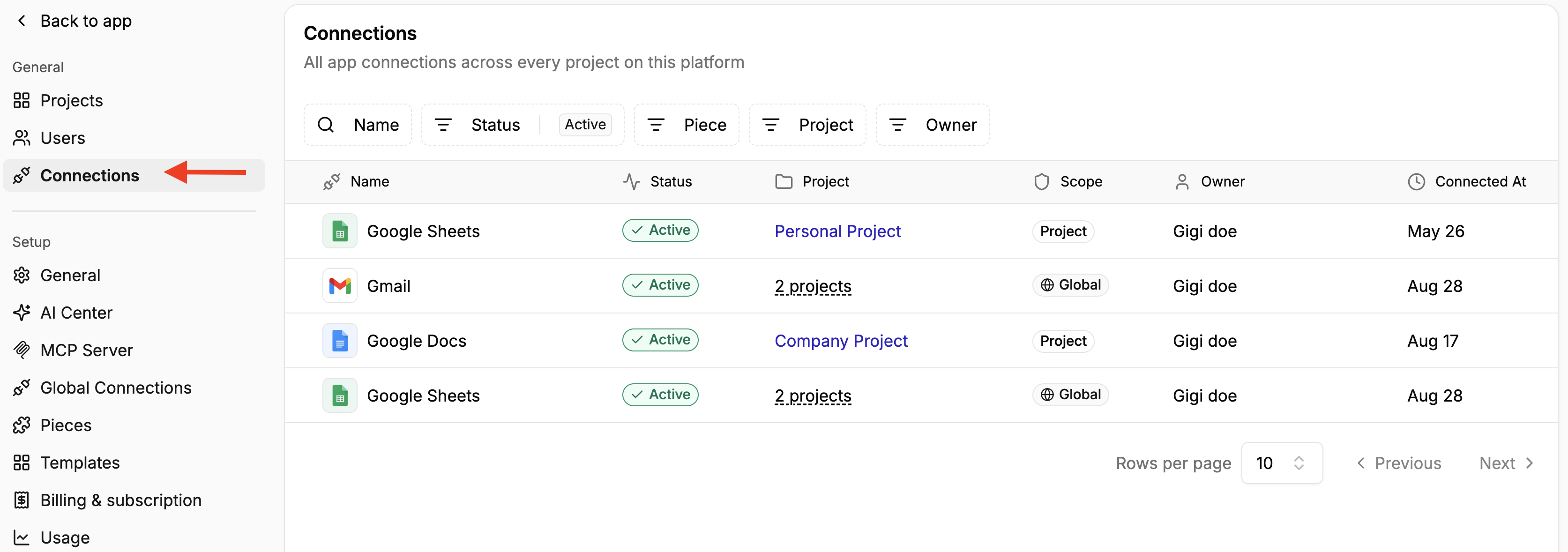
Connections are the individual accounts of third-party apps or integrations connected to your Activepieces platform. For example, when a user connects their Gmail account to Activepieces, that account is registered as one connection. If two users connect their individual Gmail accounts, Activepieces registers them as two separate connections, even though they both use the same Gmail piece. Example: Employee 1 Gmail = Connection 1 Employee 2 Gmail = Connection 2 Connections Tab The Connections page in Platform Admin gives administrators a detailed view of all app connections across every project on the platform. You can filter connections by name, status, piece, project, and owner. For each connection, you can see:
  • Its current status
  • The piece or app it belongs to
  • The project and owner associated with it
  • When the connection was created
  • The scope (whether it is available to specific projects or is a Global Connection)
If it is a Global Connection, you can also see the different projects that have access to that connection. Learn more about Connections vs Global Connections As more teams build automations, the number of connected accounts can grow quickly. The Connections page gives platform admins a single place to see which accounts are connected, who owns them, where they are used, and whether they are still active. For example, if an employee leaves the company, an admin can use the Owner filter to identify connections associated with that user and understand which projects may depend on them. Regularly reviewing connections can also help identify outdated ones  Refer to API reference